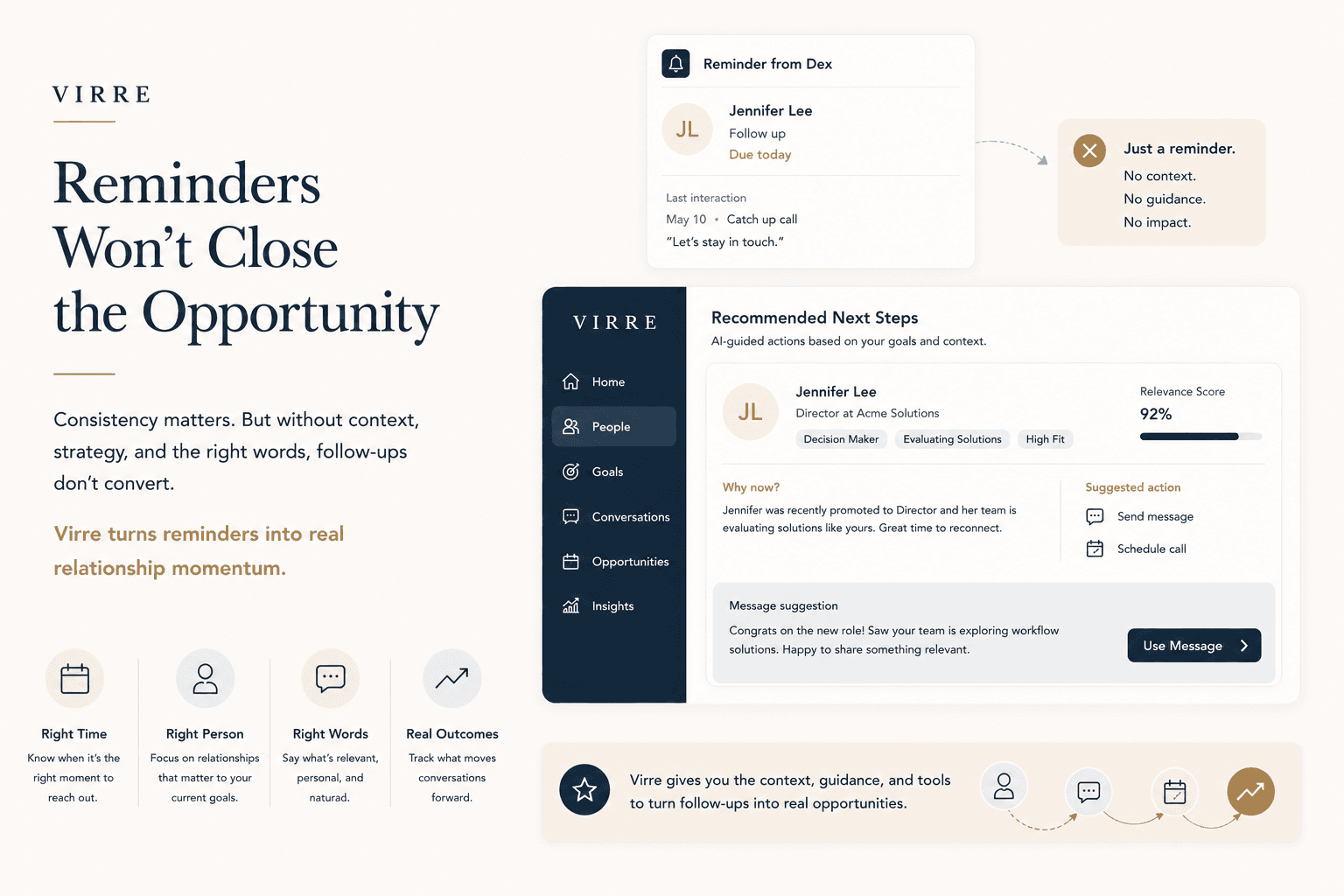
AI Messaging is the Virre feature that drafts the message for you from the context of the relationship, in your voice. You edit every word, and nothing is sent without your say.
You know who to contact. You do not know what to say.
A blank message box stops more outreach than a lack of contacts. Will it sound pushy? Is it awkward after this long? So the message waits, and the moment passes.
Up to 50%
how much people underestimated the likelihood that others would agree to a direct request for help
5,900+
participants across experiments, who significantly underestimated how much others would appreciate being reached out to
Choose a next step, such as saying thanks, reconnecting, following up or asking for a call.
2
Virre drafts it
A message in your voice, built from how you met, what you discussed and what you have in common.
3
You edit and send
Change anything, then send it by platform message, email or a meeting request. Virre keeps the context for next time.
What goes into a draft
What makes a draft sound like you?
Six things a template cannot do.
01
Your voice
Written to sound like you, not like a template.
02
Real context
How you met, what you discussed and what is still open.
03
What you have in common
A shared sector, city or connection gives you a natural opening.
04
A clear, specific ask
One request, easy to say yes to.
05
Fits your style
If you dislike cold outreach, Virre guides how to connect, not only who.
06
Yours to edit
Change anything before it goes. You always press send.
The science of networking
What research says about reaching out.
Here is what three studies found, and how AI Messaging puts each idea to work.
01
Thanks lands better than you expect
In three experiments, people wrote gratitude letters and predicted how recipients would feel. They underestimated how surprised and how positive recipients would feel, and overestimated how awkward it would be.
Kumar and Epley, Psychological Science, 2018. Article
How Virre uses it
Saying thanks is one of the first drafts it offers.
02
Asking for advice is not a weakness
Asking for advice can raise others’ perceptions of your competence, especially on difficult problems. The authors concluded that concerns about appearing incompetent may be misplaced.
Brooks, Gino and Schweitzer, Management Science, 2015. Abstract
How Virre uses it
A draft can invite someone’s advice, not only ask for a favor.
03
Old contacts still deliver
Executive MBA students who asked dormant ties for help on an important project got results that compared favorably with those from their current ties.
Levin, Walter and Murnighan, Organization Science, 2011. Abstract
How Virre uses it
A reconnect draft makes the first step easy.
For your role
What do you struggle to write?
Whatever your role, the first message is the hardest. Here is how it might sound.
AI Messaging is the Virre feature that drafts the message for you from the context of the relationship, in your voice. You see a draft that mentions how you met, what you discussed and what you have in common, you edit every word, and nothing is sent without your say.
How does Virre write the message?
Virre drafts from what it keeps about the relationship: how you met, what you discussed, what you have in common and what is still open. It writes in your voice, shows which context it used, and leaves every word open to editing before anything goes out.
Does Virre send messages for me?
No. You decide who to contact and what to say. Virre suggests a next step and drafts the message, and you edit it and press send yourself. Nothing goes out without your say, and every relationship stays yours.
Will it sound like me?
Virre drafts in your style, and you edit the result, so it ends up sounding like you. The demo shows two styles, short and direct or warm and personal. Reach out to our team and we will show how Virre learns the way you write.
What kinds of messages can it draft?
Saying thanks, reconnecting with someone you have lost touch with, following up after a meeting, asking for an introduction or a call, and inviting someone to an event. Each draft is built from the real history with that person, not from a template.
What if I dislike networking or cold outreach?
Virre considers your personality. If you are an introvert or dislike cold outreach, it guides you on how to connect, not only who. It shows what you have in common and how the person can help, then drafts a message you can edit before you send it.
Where can I send the messages?
You can reach out by platform message, email or a meeting request. Virre keeps the context of what you sent in the relationship history, so the next conversation starts with the full picture instead of a blank page.
How is it different from a general AI writing tool?
A general AI tool writes from the instructions you type, so you explain the background every time. AI Messaging writes from the relationship itself: how you met, what you discussed and what you promised, all saved in Virre. The background is already there.
How does it work with Next Best Actions?
Next Best Actions tells you who to contact today and why. AI Messaging drafts the message for that step. You see the suggestion and the draft together, edit the draft, and send it, which turns a good intention into a sent message in a few minutes.
How much does Virre cost?
Starter is free. Pro is $9.99 a month and Pro+ is $19.99 a month at limited-time prices, billed monthly, and you can cancel any time. Teams, event organizers and communities get custom pricing on the Organizations plan: talk to our team and we will shape a plan around your people.
Who is behind Virre?
I built Virre because I believe the right relationships change everything, and they rarely happen by accident. After more than 25 years in senior leadership roles, I had thousands of connections and still did not know who could actually help me when I started my own venture. Virre exists so the people who matter are never lost in a contact list. Gunjan Aggarwal, Founder and CEO of Virre.